
Difficulty: Advanced Beginner to Intermediate Reading Time: ~25 minutes Goal: To learn how to think like a router. Prerequisite: Module 1.2: Network Cartography
Introduction: Why Should You Care?
The Internet is often treated like magic. You click a button, and a movie plays. But underneath the glossy interface, the Internet is not magic—it is logistics.
Imagine you want to send a physical letter to a friend. You cannot just write “To John” on the envelope. The postal service needs a hierarchy:
Country -> City -> Street -> Building -> Apartment.
If you just wrote “John, USA,” the letter would end up in the trash.
Computer networks operate on the exact same principle. Every single bit of information—whether it’s a pixel in a Netflix show or a character in a WhatsApp message—is packaged into a “packet.” That packet must find its specific recipient among billions of devices worldwide.
To do this, we use the Internet Protocol (IP).
We are currently living through a unique historical moment in technology. We are running two versions of this protocol simultaneously:
- IPv4 (The Old Guard): Reliable, battle-tested, but running out of space.
- IPv6 (The Future): Infinite, fast, but complex for humans to read.
This guide will not just teach you how to “type in an IP address.” It will teach you the underlying mathematics and architecture of the web. By the end, you will understand exactly what happens in the milliseconds between clicking a link and seeing a page load.
Part 1. The Anatomy of IPv4
IPv4 (Internet Protocol version 4) is a technology born in the early 1980s. Despite its age, it still carries the vast majority of internet traffic today. It is based on a 32-bit address system.
1.1. What are “32 Bits”?
Computers do not understand decimal numbers like 192 or 168. They are electrical machines; they only understand two states:
- 0: No current (Off).
- 1: Current (On).
An IPv4 address is simply a string of 32 switches (bits).
To calculate the total number of possible addresses, we do the math: $2^{32} \approx 4.3$ billion addresses.
In the 1980s, 4.3 billion seemed like an infinite number. The internet was just for universities and the military. Today, when every person has a smartphone, a laptop, a smartwatch, and even a “smart toaster,” 4.3 billion is catastrophically insufficient. We ran out of “raw” IPv4 addresses years ago.
1.2. The Structure of Octets
For a human, memorizing a 32-bit string is impossible.
Try to remember this: 11000000101010000000000100000001.
It’s a nightmare.
To make this readable, engineers divided these 32 bits into 4 groups of 8 bits.
A group of 8 bits is called an Octet (from the Latin octo meaning eight) or a Byte.
We convert each Octet into a decimal number.
- Minimum value:
00000000= 0 - Maximum value:
11111111= 255 (because $1+2+4+8+16+32+64+128 = 255$).
This gives us the familiar “Dotted Decimal” format: x.x.x.x
Example: 192.168.1.1
1.3. Network Classes (Historical Context)
In the dawn of the internet, IP addresses were strictly divided into “Classes.” While modern routers use a more flexible system called CIDR (which we will cover later), understanding Classes is essential because they defined the “default” subnet masks we still see today.
- Class A (The Giants):
- Range:
1.0.0.0to126.0.0.0. - The Logic: The first number is the Network. The remaining three numbers are for Hosts.
- Capacity: 16 million devices per network.
- Who owns them? Massive entities like Apple, HP, MIT, and the US Military.
- Range:
- Class B (Mid-sized Business):
- Range:
128.0.0.0to191.255.0.0. - The Logic: The first two numbers are the Network.
- Capacity: 65,534 devices.
- Range:
- Class C (Small Networks – That’s Us):
- Range:
192.0.0.0to223.255.255.0. - The Logic: The first three numbers are the Network. Only the last number is for Hosts.
- Capacity: 254 devices.
- Range:
1.4. Private vs. Public Addresses (The NAT Miracle)
If we ran out of IPv4 addresses, why didn’t the internet crash?
We were saved by a clever trick called NAT (Network Address Translation) and Private IP Ranges.
Engineers reserved specific blocks of addresses that cannot be routed on the public internet. These addresses only exist inside your local network (LAN)—your house, your office, your coffee shop.
The Reserved Private Ranges:
10.0.0.0–10.255.255.255(Often used in corporate offices).172.16.0.0–172.31.255.255(Used by AWS and Docker).192.168.0.0–192.168.255.255(The standard for home routers).
How it works:
Millions of people have the address 192.168.1.1 inside their homes. They don’t conflict because they are isolated islands. When they want to talk to Google, their router takes their packet, swaps the “Private IP” for the router’s single “Public IP,” and sends it out.
Part 2. DHCP and DNS: The Invisible Helpers
Before diving into complex math, we must define how your computer gets an IP and how it finds websites. These are the two pillars that make IP addressing usable for humans.
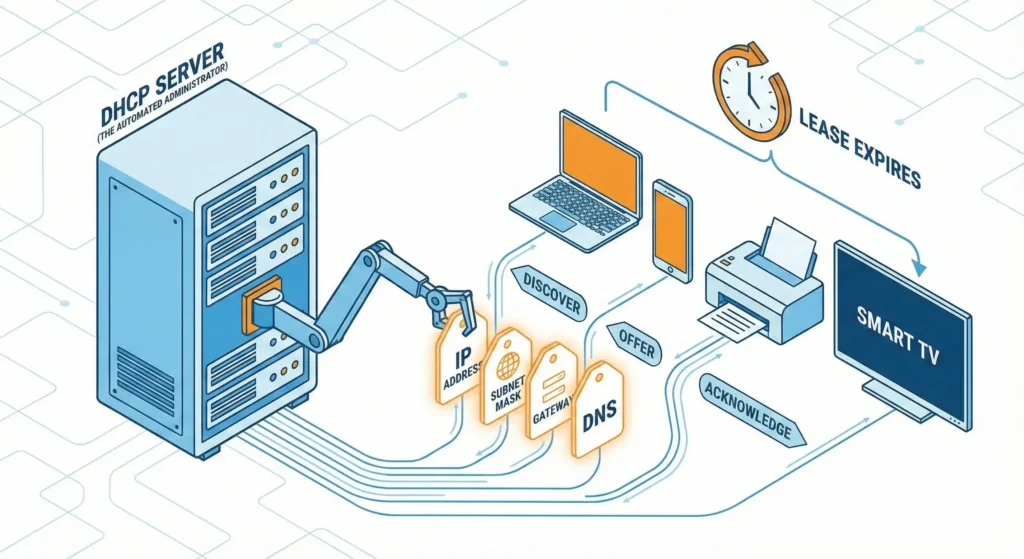
2.1. DHCP (The Automated Administrator)
In the old days, you had to manually type an IP address into every computer. If you typed the same number twice, the network crashed.
Today, we use DHCP (Dynamic Host Configuration Protocol).
Think of DHCP as the Hotel Receptionist.
- You (the laptop) walk into the hotel (the network).
- You shout: “I need a room!” (DHCP Discover).
- The Receptionist (Router) looks at their clipboard, finds an empty room (IP address), and tosses you the key. “You are in room 192.168.1.55. Check-out is in 24 hours.”
This is why you don’t need to configure your phone when you walk into Starbucks. DHCP handles the logistics.
2.2. DNS (The Phonebook)
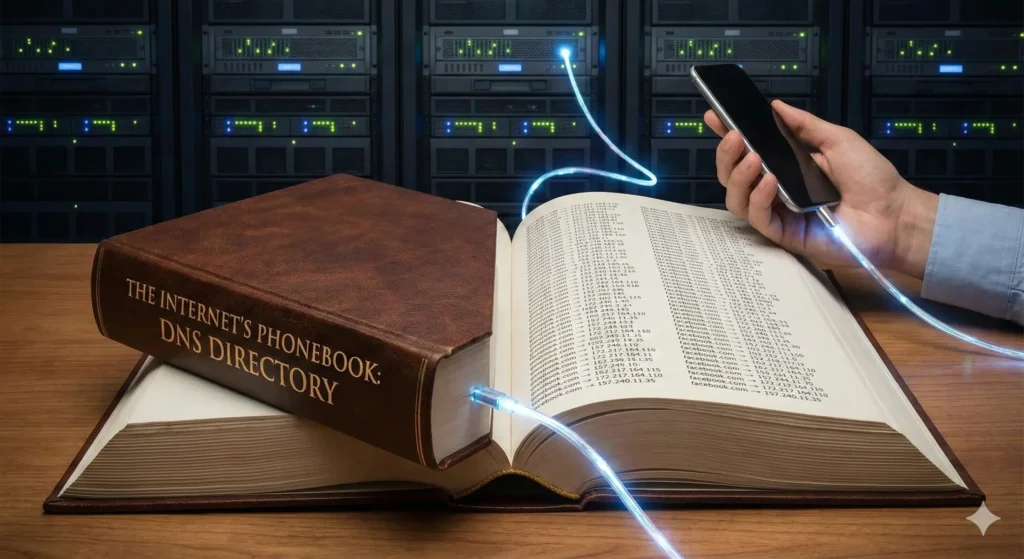
Computers speak numbers (142.250.190.46). Humans speak words (google.com).
DNS (Domain Name System) is the translator.
When you type google.com:
- Your computer asks a DNS Server: “What is the IP for https://www.google.com/url?sa=E&source=gmail&q=google.com?”
- The DNS Server replies: “It is 142.250.190.46.”
- Your computer then sends packets to that IP.
Security Note: This process is often unencrypted. Hackers can see every “Phonebook lookup” you make. This is why a VPN is crucial—it encrypts these lookups so your ISP doesn’t know what sites you are visiting.
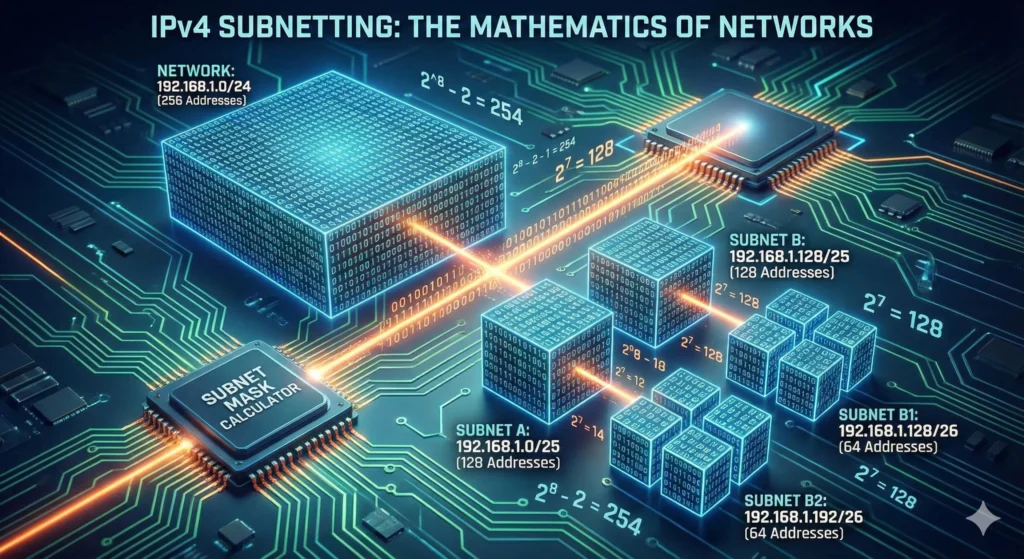
Part 3. IPv4 Subnetting: The Mathematics of Networks
This is the barrier to entry for IT professionals. Subnetting is the art of taking a network and slicing it into smaller, isolated pieces.
Why do we need Subnetting?
- Security: The HR department’s computers should not be visible to the Guest Wi-Fi.
- Performance: To reduce “Broadcast Storms.” If 5,000 computers are in one group, and one screams “Where is the printer?”, 4,999 others have to stop and listen. Subnetting creates soundproof walls.
3.1. The Subnet Mask: The Ruler
An IP address has no meaning without a Subnet Mask. The mask tells the computer: “Where does the Street Name end and the House Number begin?”
A mask is always a sequence of 1s followed by 0s.
- 1: This part is the Network (Locked).
- 0: This part is the Host (Variable).
Example: 255.255.255.0
In Binary: 11111111.11111111.11111111.00000000
This tells the router: “The first 24 bits are the Street. The last 8 bits are the House.”
3.2. CIDR (Slash Notation)
Typing 255.255.255.0 is tedious. Engineers use CIDR (Classless Inter-Domain Routing). We simply count the number of “1s” in the mask.
255.0.0.0= /8255.255.0.0= /16255.255.255.0= /24
3.3. How to Calculate a Subnet (Step-by-Step)
Let’s solve a real-world scenario.
Given: Network 192.168.10.0/24.
Goal: Divide this into 4 smaller networks for different departments.
Step 1. Analyze the Starting Point.
/24 means we have 24 network bits.
We have 8 bits left for hosts (32 total – 24 used = 8).
$2^8 = 256$ total addresses.
Step 2. The Borrowing Formula.
To create sub-networks, we must “borrow” bits from the Host section and give them to the Network section.
Formula: $2^n = \text{Number of Subnets}$, where $n$ is bits borrowed.
We need 4 subnets.
$2^n = 4$.
$n = 2$.
We need to borrow 2 bits.
Step 3. The New Mask.
Old Mask: /24.
New Mask: /24 + 2 = /26.
Let’s convert /26 to decimal.
The last octet was 00000000.
Now it is 11000000 (we borrowed the first 2 bits).
Binary 11000000 = Decimal 192 ($128 + 64$).
New Subnet Mask: 255.255.255.192.
Step 4. Calculate the Ranges (The Magic Number).
How many hosts are left?
We had 8 bits. We borrowed 2. We have 6 left.
Formula for usable hosts: $2^h – 2$ (minus Network ID and Broadcast).
$2^6 – 2 = 64 – 2 = 62$ hosts per subnet.
The “Magic Number” (Increment) = $256 – 192 = 64$.
** The Resulting Map:**
- Subnet A (Admin):
192.168.10.0to192.168.10.63 - Subnet B (Sales):
192.168.10.64to192.168.10.127 - Subnet C (HR):
192.168.10.128to192.168.10.191 - Subnet D (Guest):
192.168.10.192to192.168.10.255
3.4. The Binary AND (How Routers Think)
How does a computer know if an IP is local or remote? It performs a Binary AND operation.
It multiplies the IP address by the Subnet Mask bit by bit.
1 AND 1 = 11 AND 0 = 00 AND 0 = 0
If the result matches the local Network ID, the computer sends the packet directly. If it doesn’t match, it sends the packet to the Gateway (Router).
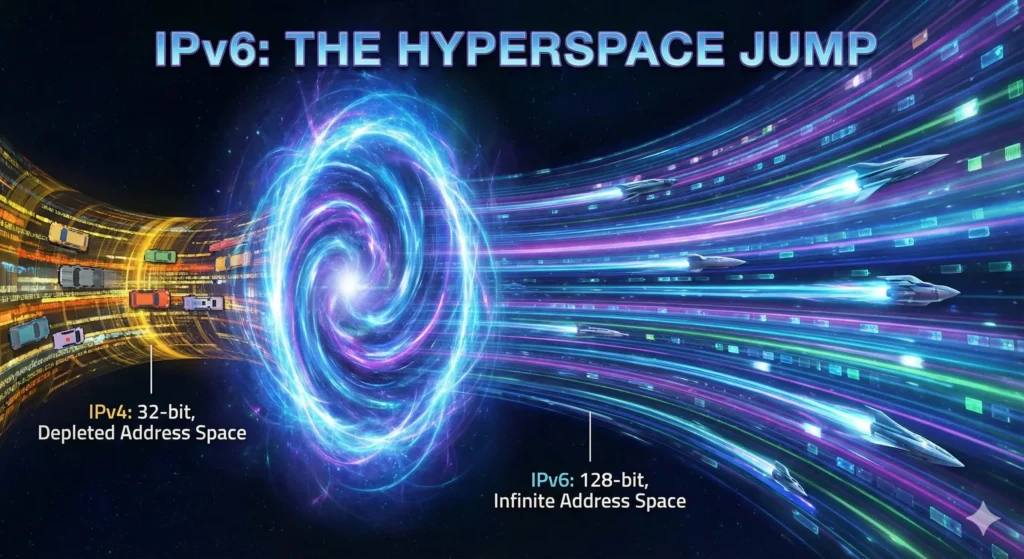
Part 4. IPv6: The Hyperspace Jump
IPv4 is dead. We are just keeping it on life support with NAT. For the world of IoT (Internet of Things), where every lightbulb and refrigerator needs an internet connection, we need a new scale.
4.1. The Scale of IPv6
IPv6 uses a 128-bit system.
- IPv4: $4.3$ Billion addresses.
- IPv6: $340$ Undecillion addresses ($3.4 \times 10^{38}$).
The Analogy:
If IPv4 is a bucket of sand, IPv6 is the sun.
We could assign an IPv6 address to every single atom on the surface of the Earth, and we would still have enough left over for another 100 Earths.
4.2. Hexadecimal Notation
Writing 128 ones and zeros is impossible. So, IPv6 uses Hexadecimal (Base16).
Digits: 0-9 plus letters A-F (where A=10, F=15).
An address is divided into 8 blocks (hextets) of 16 bits, separated by colons.
Example: 2001:0db8:85a3:0000:0000:8a2e:0370:7334
4.3. Compression Rules (Sanity Savers)
To make these long strings readable, engineers created rules:
- Leading Zeros: You can remove zeros at the start of a block.
0db8becomesdb8.0000becomes0.
- Double Colon: Once per address, you can replace a long string of consecutive zero blocks with
::.2001:db8:0:0:0:0:0:1becomes2001:db8::1.
4.4. IPv6 Address Types (RIP Broadcast)
In IPv6, there is no “Broadcast” (shouting to everyone). It was inefficient.
- Unicast: One-to-One.
- Global Unicast: Public address (starts with
2000::/3). This works on the internet. - Link-Local: Works only within the cable/Wi-Fi (starts with
FE80::). Every device creates this automatically to talk to neighbors.
- Global Unicast: Public address (starts with
- Multicast: One-to-Many (starts with
FF00::). “Who wants to watch this video stream? Raise your hand.” - Anycast: One-to-Nearest. You send a packet to one address, and the network routes it to the physically closest server (e.g., Google DNS).
- Unlike IPv4, IPv6 has no “Broadcast.” It uses Multicast (“Who wants to listen?”) and Anycast (“Connect to the nearest server”).
- For more technical details on address allocation, you can check the IANA IPv6 Registry.
Part 5. IPv6 Subnetting: The Simplicity of Abundance
In IPv4, subnetting is stressful math designed to save scarce addresses.
In IPv6, we don’t need to save anything. Subnetting becomes a design choice.
5.1. The Standard /64 Structure
Almost always, IPv6 LANs use a /64 mask.
This splits the address exactly in half:
- First 64 bits: Network Prefix (Location).
- Last 64 bits: Interface ID (Who you are).
5.2. The Subnet ID (The 4th Block)
A typical Global Unicast address looks like this:
[ Global Routing Prefix (48 bits) ] + [ Subnet ID (16 bits) ] + [ Interface ID (64 bits) ]
- Global Routing Prefix: Given to you by your ISP.
- Subnet ID: This is your playground. You have 16 bits here.$16$ bits gives you $2^{16} = 65,536$ subnets.
You don’t need to borrow bits or calculate magic numbers. You just count in Hex:
- Subnet 1:
2001:db8:abcd:0001::/64 - Subnet 2:
2001:db8:abcd:0002::/64 - …
- Subnet 65,535:
2001:db8:abcd:FFFF::/64
It is incredibly simple. Each one of these subnets can hold 18 quintillion devices.
Part 6. Cybersecurity Implications of IP Addressing
Since this guide is for security-minded individuals, we must discuss the risks.
6.1. The IPv6 Leak
Many older VPNs only protect IPv4 traffic.
The Scenario:
- You turn on a cheap VPN. It creates a tunnel for IPv4.
- You visit a modern site like Facebook (which prefers IPv6).
- Your Operating System sees that IPv6 is available and faster.
- Because the VPN didn’t configure an IPv6 tunnel, the traffic bypasses the VPN entirely.
- Result: Your real identity is exposed.
The Fix: Use a high-quality VPN like NordVPN that either supports IPv6 tunneling or has a “Kill Switch” to block unauthorized IPv6 traffic.
6.2. The Death of NAT
In IPv4, NAT acted as a crude firewall. Devices behind a router couldn’t be reached directly from the internet.
In IPv6, every device gets a Global Unicast Address. Theoretically, a hacker can scan your smart fridge directly from the internet.
The Fix: IPv6 security relies entirely on Firewalls. Your router must be configured to drop incoming traffic by default.
6.3. SLAAC Attacks
IPv6 devices can auto-configure themselves using SLAAC (Stateless Address Auto-Configuration). A hacker can plug into a network and announce: “I am the new IPv6 router.” All traffic will unknowingly flow through them. This is the IPv6 version of the Man-in-the-Middle attack.
Summary: The Professional’s Cheat Sheet
- IPv4 is a 32-bit decimal system (
192.168.1.1). Addresses are scarce, so we rely on NAT. - IPv4 Subnetting divides networks using binary math. Remember the formula $2^n$ for subnets and $2^h-2$ for hosts.
- CIDR (/24) is the standard way to write masks. It counts the network bits.
- IPv6 is a 128-bit Hex system (
2001:db8::1). Addresses are infinite. - IPv6 Subnetting is easy: just change the 4th block of numbers. Use
/64for everything. - Security: Always check for IPv6 Leaks. If your VPN ignores IPv6, you are not anonymous.