
Introduction: Trust is a Vulnerability
Imagine the scene. You walk into your favorite coffee shop. You order a latte, open your laptop, and see a familiar network: Starbucks_Free_WiFi. The signal is full, the lock is open. You click “Connect.”
A second later, you’re checking your email, typing in your Facebook password, or paying a bill with your credit card. Everything looks normal. The internet works.
But in the corner sits a guy wearing headphones. There is no coffee in front of him, just a laptop and a strange black box with antennas. He isn’t drinking a latte. He is watching a screen where your passwords, photos, and search history are appearing in real-time.
You didn’t connect to the coffee shop’s router. You connected to him.
This is called an “Evil Twin” attack. It is one of the most dangerous, easiest to execute, and hardest to detect attacks in the world of wireless networks. In this article, we will break it down to the atomic level: from the psychology of the victim to the technical setup of the hardware, and, of course, we will learn how to defend ourselves.
Part 1. Anatomy of an Evil Twin
To understand how an Evil Twin works, you need to stop thinking of Wi-Fi as a “cable without wires.” You need to think of it as a radio station.
What is an Evil Twin?
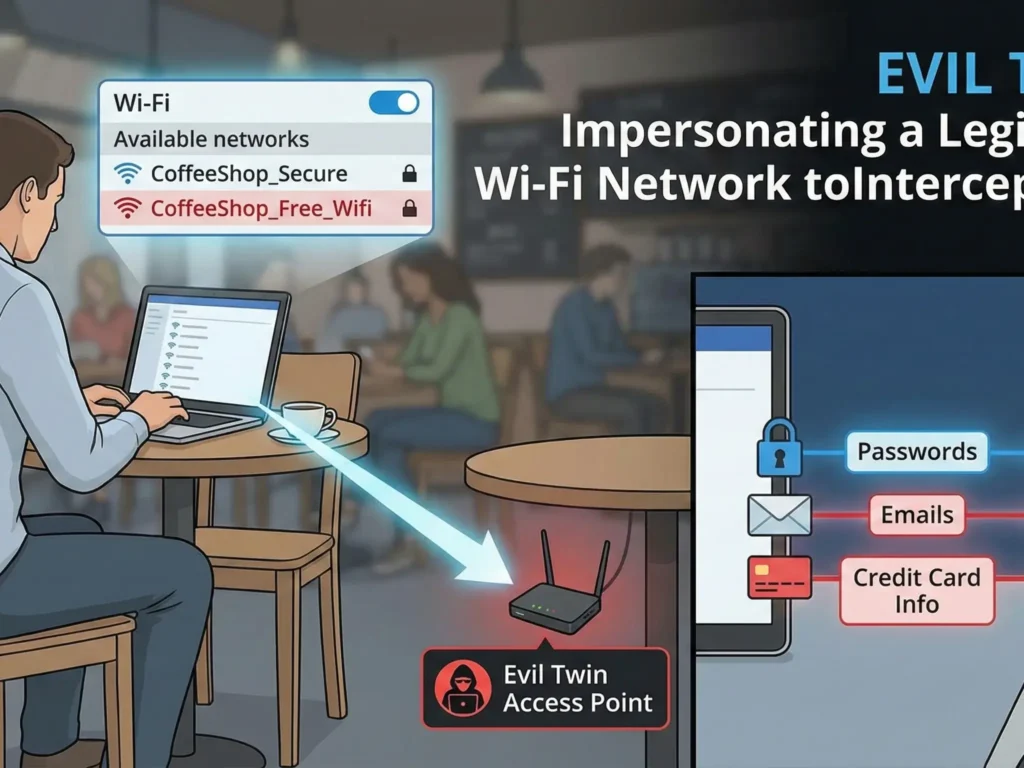
An “Evil Twin” attack is the creation of a rogue Wi-Fi Access Point that masquerades as a legitimate network. Hackers copy the network name (SSID) and sometimes even the MAC address of the real router to trick your device.
The Main Goal: Force the victim to connect to the fake network instead of the real one.
As soon as the victim connects, the hacker is in a Man-in-the-Middle position. All of the victim’s internet traffic passes through the hacker’s device before reaching the real internet. The hacker becomes your ISP, your router, and your spy all at once.
Why Does It Work? (Device Psychology)
Your smartphone and laptop are “dumber” than you think. They are programmed for convenience, not security. Here are two main principles that hackers exploit:
- Auto-Connect: Most devices are set to automatically connect to known networks. If you have ever been on a
McDonalds Wi-Finetwork, your phone remembers it. When it sees a network with the same name, it doesn’t ask you—it connects. - Strong Signal Priority: If a phone sees two networks with the same name (SSID), it doesn’t analyze which one is real. It chooses the one with the stronger signal.
- Real Router: Located in the back room behind three walls. Signal is weak (-80 dBm).
- Hacker: Sitting at the next table. Signal is powerful (-30 dBm).
- Result: Your phone chooses the hacker without hesitation.
Part 2. The Hacker’s Toolkit
You don’t need a secret service budget to carry out this attack. The equipment is available to everyone, and that is terrifying.
1. Wi-Fi Pineapple
This is a legendary device in the world of pentesting (penetration testing), created by the company Hak5.
- What it is: A specialized router with multiple radio modules.
- Price: About $100-$200.
- Capabilities:
- Can simultaneously scan the airwaves and provide internet access.
- Has a suite of programs (“modules”) to automate attacks.
- Can deceive thousands of devices at once.
2. ESP8266 / ESP32 (Budget Option)
This is a microcontroller costing $2. If you install “Deauther” firmware on it, it can “jam” Wi-Fi networks, forcing users to disconnect from the real router and look for another one (yours).
3. Laptop + Powerful Wi-Fi Adapter
The classic kit: a laptop running Kali Linux and an Alfa adapter (known for its ability to go into monitor mode and inject packets).
Disclaimer: The description of technical details is provided solely for educational purposes. Using this equipment to hack networks you do not own is illegal and punishable by criminal law.
Part 3. Stages of the Attack (Step-by-Step)
Let’s break down exactly how the attack happens, step by step.
Stage 1: Reconnaissance
The hacker arrives at the target zone (cafe, airport, hotel). He switches his equipment into monitor mode. He sees:
- SSID: Names of networks around (e.g.,
Hotel_Guest). - BSSID: MAC addresses of routers.
- Clients: Exactly who is connected to these networks.
- Channel: Which frequency the network operates on (1, 6, or 11).
The hacker chooses a target. Let’s say it’s the crowded CoffeeShop_Free network.
Stage 2: Cloning
The hacker launches his access point (Evil Twin). He sets an identical SSID: CoffeeShop_Free. He can even copy the MAC address of the original router to bypass simple security systems.
Now there are two networks with the same name in the air.
Stage 3: Deauthentication (The “Kick”)
This is the most aggressive part of the attack. As long as you are connected to the real router, you won’t connect to the hacker. The hacker needs to “kick” you off the network.
He uses a Deauthentication (Deauth) attack. This is a special Wi-Fi management packet that tells your device: “I am the router. An error occurred. Disconnect immediately!” Your phone obeys and breaks the connection. This happens in milliseconds.
Stage 4: The Hook
Your phone, having been disconnected, starts frantically searching for the familiar CoffeeShop_Free network to restore connection. It sees two networks:
- The real one (signal is weak because you are far away).
- The fake one (signal is powerful because the hacker is nearby).
The phone connects to the fake one. You don’t even notice the internet vanished for a second. You are on the hook.
Stage 5: Harvesting
Now you are on the hacker’s local network.
- Option A (Passive): The hacker simply passes your traffic through himself, recording everything not encrypted by HTTPS.
- Option B (Active – Captive Portal): The hacker shows you a login page. It looks exactly like a hotel or Facebook page.“To continue using the internet, please log in via Google/Facebook”. You enter your password—and it flies straight into the hacker’s database.
Part 4. Going Deeper: The KARMA Attack
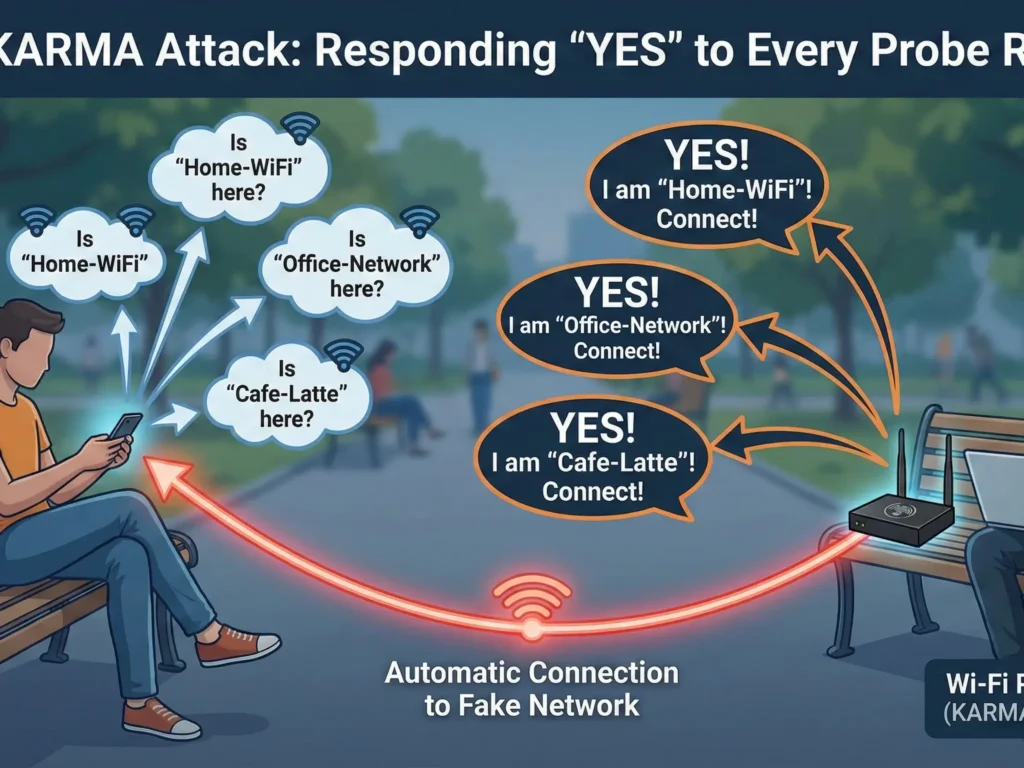
There is an even more insidious variation of the Evil Twin attack that doesn’t require a real network to be nearby. It is called KARMA (or MANA in newer variations).
Remember how we said the phone “shouts” network names? This is called a Probe Request. When your Wi-Fi is on but you aren’t connected, the phone sends requests into the ether:
- “Is Home-WiFi here?”
- “Is Office-Network here?”
A normal router ignores requests if the name doesn’t match. But a device with a KARMA attack (like the Wi-Fi Pineapple) answers “YES” to every request.
- Phone: “Looking for ‘MyHomeWiFi’!”
- Pineapple: “I am ‘MyHomeWiFi’! Connect!”
Thus, the hacker doesn’t even need to know the name of the cafe’s network. He creates a personal fake network for each client, using names from their own list of trusted networks. It looks like magic: you take out your phone in a park, and it shows you are connected to your home Wi-Fi. But you are in a trap.
Part 5. Does HTTPS Save You?
You might think: “But almost all sites use HTTPS (green padlock) now. Isn’t my data encrypted?”
Yes and no.
- SSL Stripping: A hacker can use tools like SSLstrip. When you try to go to
https://bank.com, the hacker intercepts the request and connects to the bank via HTTPS on his own behalf, but serves you an unsecured versionhttp://bank.com. You see the bank site, enter your password, but there is no encryption. - DNS Spoofing: The hacker controls the DNS server. You type
facebook.com, and he directs you not to Facebook’s real IP, but to his local server with a perfect copy of the login page (phishing). - Metadata: Even with HTTPS, a hacker sees where you go (domains) and how much time you spend there. This is enough to build a detailed profile of the victim.
Part 6. How to Detect an Evil Twin?
It is extremely difficult for a normal user to detect an Evil Twin, but there are a few signs:
- An “Open” network where it shouldn’t be. If your home Wi-Fi suddenly became open (no password)—it’s an Evil Twin.
- Strange behavior of login pages. If you have connected to this network before, and now it asks for a password or social media login again—this is a red flag.
- Slow internet. Since the hacker uses mobile internet or a weak Wi-Fi adapter to forward your traffic, speed can drop significantly.
- Browser warnings. If Chrome or Safari scream “Connection is not private” or “Certificate is invalid”—NEVER ignore this. It means someone (likely an Evil Twin) is trying to substitute the encryption.
Part 7. How to Protect Yourself? (Real Solutions)
We cannot force hackers to disappear. We cannot ban coffee shops from using cheap routers. But we can build our own fortress.
1. Wi-Fi Hygiene
- Turn off auto-connect. Go into your phone settings and turn off the “Automatically connect” feature for public networks.
- “Forget” networks. Regularly clean your list of saved networks. Don’t let your phone shout the names of your home and work access points into the ether.
- Turn off Wi-Fi when not using it. This not only saves battery but also saves you from KARMA-type attacks.
2. Use Mobile Data (LTE/5G)
If you are doing something important (banking, work email), it is better to share internet from your phone (Hotspot) than to connect to suspicious Wi-Fi. Hacking LTE is significantly harder and more expensive than Wi-Fi.
3. The Ultimate Defense: VPN (Virtual Private Network)
This is the only way to be 100% sure of safety on a public network.
How a VPN Defeats an Evil Twin:
Imagine you got caught anyway. You connected to the hacker. Your traffic flows through his laptop. But if you have a VPN enabled (for example, NordVPN), the situation changes:
- Tunneling: All your traffic is packed into an encrypted container before it leaves your phone.
- Encryption: Protocols like NordLynx (based on WireGuard) with AES-256 or ChaCha20 encryption are used.
- Result for the hacker: He sees a stream of data. But it isn’t “password from Facebook” and not “photo of a cat.” It is a set of random symbols that is impossible to decrypt.
The hacker simply becomes a “pipe.” He transmits your data to the internet but cannot read it or modify it.
Why NordVPN?
- Auto-Connect: The auto-connect feature turns on the VPN as soon as you join an untrusted Wi-Fi network. You won’t forget to protect yourself.
- Threat Protection: Blocks known phishing domains. Even if an Evil Twin redirects you to a fake banking site, NordVPN can block that connection.
Conclusion: Paranoia or Necessity?
Some say: “Who needs my data? I’m not the president.” This is a mistake. Hackers don’t care who you are. They need your credit cards, your accounts for spam, your digital identity to sell on the Dark Web.
The Evil Twin attack isn’t a script from a James Bond movie. It is a reality that a school kid can create with $50 worth of equipment at the nearest shopping mall.
The internet is a public space. Going out into it without protection is like walking down a busy street in transparent clothes.
Don’t be easy prey. Encrypt your traffic.
🛡️ Special Offer for Readers
Want to stop worrying every time you connect to Wi-Fi in a hotel or cafe?
We have arranged exclusive terms for our readers. Get complete protection against Evil Twin, Man-in-the-Middle, and sniffing.
👉 [Get NordVPN with 74% OFF + 3 Months FREE] (30-day money-back guarantee. Try it risk-free.)
What’s Next? In the next part (Part 3), we will look under the hood of the hacker’s scariest tool—Wireshark. We will show you exactly what your unencrypted passwords look like on an attacker’s screen.
[Read Part 3: Wireshark for Beginners]